Kangarootime can be configured to suspend the guardian check-in and check-out process for family accounts with an overdue balance. The suspension feature can be applied to specific billing cycles and selected schools to flag accounts that meet both criteria. This app restriction does not prevent the student from being checked in or out. Instead, it requires the family to work directly with a staff member, who can facilitate the check‑in or check‑out process until the account issue is resolved.
When an account is flagged as overdue, parents or guardians will be unable to use KT Connect to check their student(s) in or out. The message displayed varies based on the contact’s permission level, either prompting the guardian to address the outstanding balance or indicating that the account is experiencing an issue. The suspended Check-in feature will also block a parent from scheduling a new casual (drop-in) booking or Express Check-in until their account balance is paid.
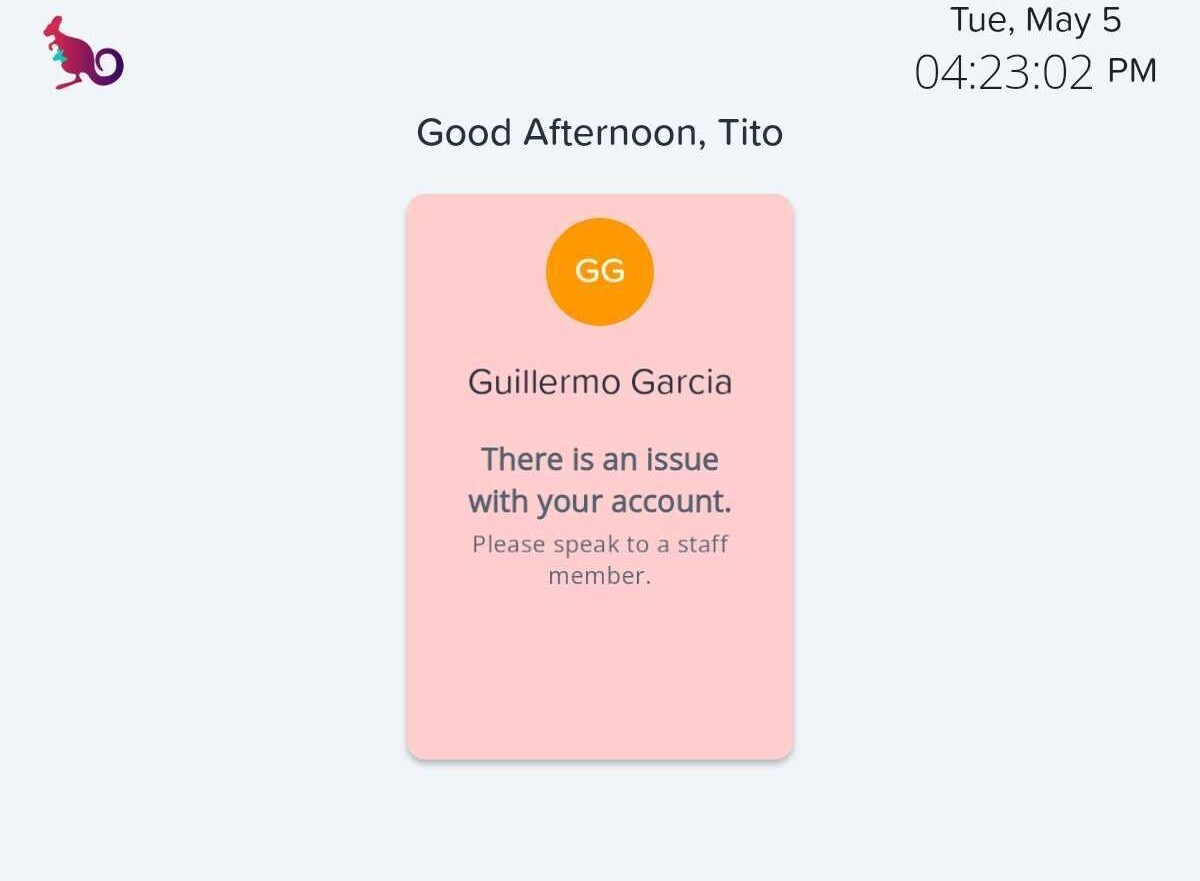
Within the Kiosk app, a prompt will be displayed indicating there is an issue with the account, blocking the check-in/out experience, and advising the guardian to speak with a staff member.
Table of Contents
Permission to View a Family Account Standing
Configure Suspended Check In/Out - (Single Location)
Configure Suspended Check In/Out - (Multiple Locations)
Overdue Account Experience in KT Connect
Overdue Account Experience in Kiosk
Visibility of a Bad Standing Account
Configuration
Permissions to Configure
- Administrators with Edit-level Billing Cycle Templates permissions in the Money permission table can configure which billing cycles are eligible for Bad Standing.
- Administrators with Center Main Edit-level permissions in the General permission table can configure the Check in/out Blocking feature.
Permission to View a Family Account Standing
- Staff with Read-only permissions to Family Account Main in the People permission table, along with Read-only permissions for Family Account Billing Cycles in the Money permission table, can view whether an account is in Bad Standing.
Step 1 -Configure the billing cycle and flag the timeframe for suspended check in/out
Billing Cycle Configuration
- Select Billing
- Select Settings
- Select Cycles
- Scroll to the Billing Cycle, a suspended check in/out applies
- Select the three-dot Action button
- Select Edit
- Locate the section Flag account as bad standing when overdue by
- Select a timeframe from the drop-down menu
- Do Not Flag
- 1 week overdue
- 2 weeks overdue
- 3 weeks overdue
- Select Save
Step 2 - Set the locations for suspended check ins/outs. This step is required to block a family from checking in or checking their child using the Kisok app and KT Connect app.
Configure Suspended Check In/Out - (Single Location)
- Select Configuration
- Select Schools
- Select School
- Select Policies
- Toggle ON Check In/Out Blocking
Configure Suspended Check In/Out - (Multiple Locations)
- Select Configuration
- Select Schools
- Select School Locations (3 options)
- Select the grey ribbon checkbox to select all visible school locations
- Expand the grey ribbon check box to Select All Results or Select All Visible Results
- Select individual location checkboxes
- Select Set Check In/Out Blocking
- Select Enable check in/out blocking
- Select Confirm
Parent Experience - Overdue Account Experience in KT Connect
When a parent or guardian with billing privileges has an overdue balance, an Overdue Account Banner will appear in KT Connect.
- An Overdue Account banner displays over the Student Icons when the Express Check-in feature is on.
- A parent with an overdue balance that selects the Check In/Out tile in KT Connect will see a message indicating their account is overdue.
- The parent will be blocked from checking their child in or out.
- A Pay Bill button will be available on both banner screens, allowing parents to access and quickly make a payment.
Parents or guardians without billing permissions:
- A message will display indicating there is an issue with the account
- The message will instruct the parent or guardian to see a staff member
Kiosk App Experience for Overdue Accounts
Parents or guardians with an overdue balance who use the Kiosk app will be blocked from checking their child(ren) in or out.
- A message will display indicating there is an issue with the account
- The message will instruct the parent or guardian to see a staff member
Business
Visibility of a Bad Standing Account
Billing cycles configured to flag overdue accounts are now classified as In Bad Standing. These accounts can be viewed by navigating to the Billing > Accounts screen and using the Billing Status filter under List Options.
Individual account pages will also display if an account is in Bad Standing. This view is available in the Familes Account Billing page. A banner will appear on the Billing page indicating the account is in bad standing.
If you have any questions, please contact helpdesk@kangarootime.com